Ants in your laptop? How to get them out of the keyboard and keep them from coming back
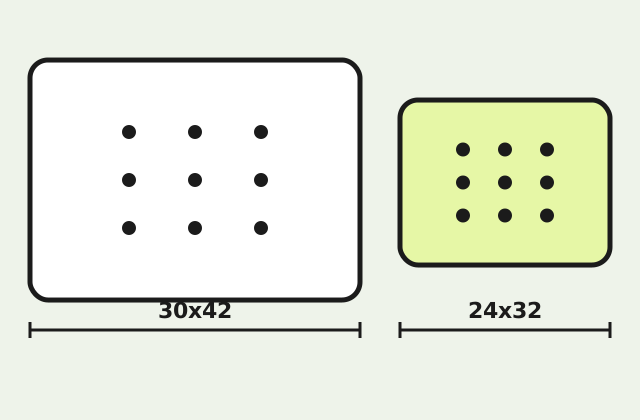
 KAI67 anti-ant pad, large 30x42 cm฿148 · 1 pad · Order via LINE or fill in the form
Order ฿148LINE @814ddrza
Swipe for the next topic · 17 topics
Ants in your laptop come from 3 things together: snack crumbs and sugary drink residue on the keyboard or desk, the warmth of the machine, which ants like to live in, and an ant trail that already runs across the desk.
The good news is that most cases can be fixed yourself in 2–3 days without sending the laptop for repair. The bad news is that the things people do most often, like spraying the laptop or leaving it out in the sun, damage the machine more than the ants do. This article explains why ants get in, how to get them out safely, what not to do, and how to keep them from coming back by rearranging your desk and resting the laptop on an anti-ant pad.
Why do ants get into laptops?
Ants come for food, warmth and a route. People who snack in front of the screen leave crumbs between the keys without noticing. A single drop of a sugary drink next to the laptop is enough for ants to send hundreds of scouts. Once ants find that the space under the laptop is warm and dark, some species will move their nest into the vents. And a desk against a wall or near a window is often already on an ant route, so the laptop is just a stop along the way that happens to have food.
Are ants inside a laptop harmful to it?
Ants don't chew cables the way rats do. But lots of dead ants inside the machine, food scraps the ants carry in, and nests built in the vents can clog the fan and make the laptop run hot. In some cases dead ants on the circuit board cause a short circuit when there is moisture. So most of the damage comes from leaving the problem too long or fixing it the wrong way, not from a few live ants.
How do you get ants out of a laptop keyboard?
Shut down the laptop, unplug it, then gently turn it upside down over a white cloth so ants and crumbs fall out. Blow air along the gaps between the keys and into the vents with a can of compressed air or a rubber air blower. Brush crumbs out with a soft-bristled brush. Then leave the laptop with the lid open in an air-conditioned room, or any cool, bright room, for 1–2 hours. Ants dislike cool, bright places and will gradually leave on their own. Repeat once a day for 2–3 days.
In the meantime, put gel ant bait or bait stations on the floor away from the laptop to draw the ants off the desk to eat the bait and carry it back to the nest. This cuts ant numbers at the source without using any chemicals on the laptop.
What should you not do when ants get into your laptop?
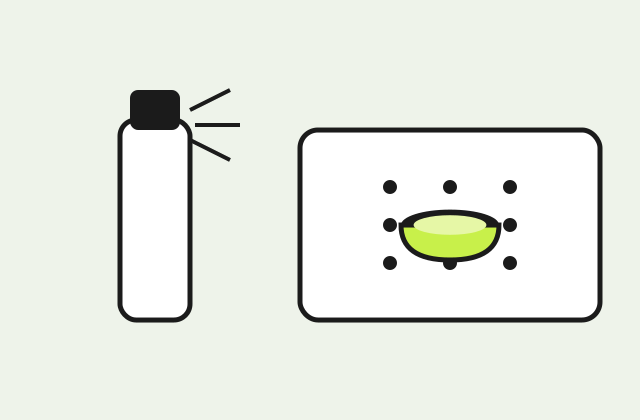
Don't spray ant killer on the laptop: the oily mist coats the circuit board and makes keys stick. Don't put the laptop out in the sun or leave it in a sealed bag in the sun: the heat makes the battery swell and damages the screen. Don't hold a high-powered vacuum cleaner against the keyboard: keys can come off and static electricity may damage components. Don't pour water or alcohol over it, and don't open the laptop yourself if you have never done it before. If there are so many ants inside that you keep seeing them walk out of the vents, take it to a repair shop for an internal clean.
How do you stop ants from coming back to your laptop?
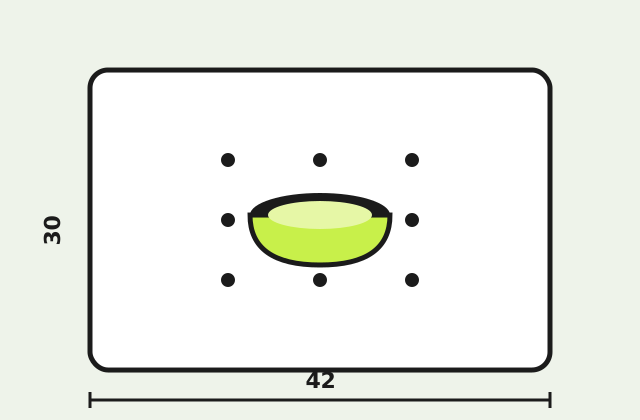
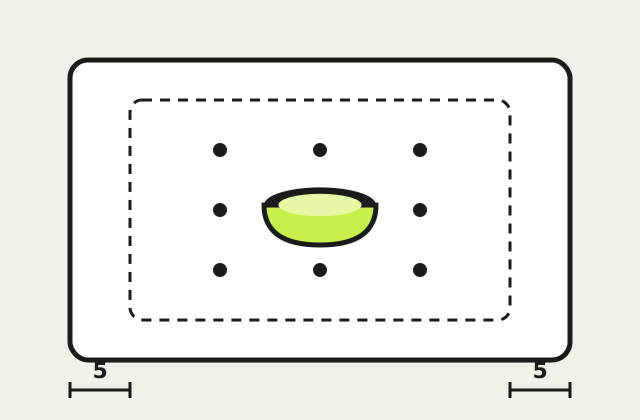
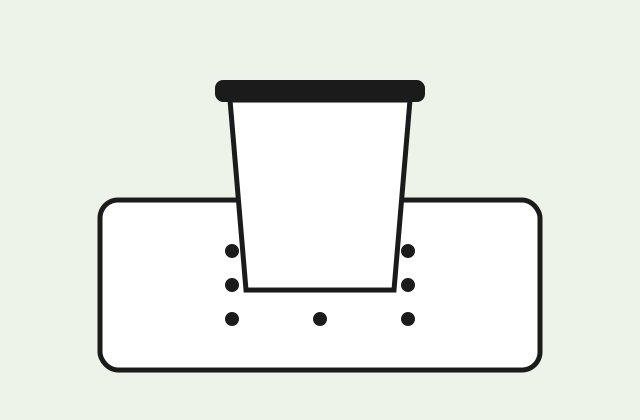
Sort out your desk in 4 ways. One, don't snack over the keyboard, and wipe the desk every day. Two, move the desk at least 5 cm away from the wall to cut off the bridge from the wall. Three, tidy cables so they don't hang down to the floor, because cables are the route onto the desk that people overlook. Four, rest the laptop on an anti-ant pad when not in use, in the middle of the pad and 5 cm from the edge. If ants are climbing the table legs, add anti-ant table leg cups as well.
Can you use an anti-ant pad with a laptop, and what size?
Yes, as a place to rest the laptop when it is not in use or while charging overnight. A 13–14 inch laptop is about 30–32 cm wide and 21–23 cm deep; on a 30x42 cm pad it leaves just about a 5 cm margin. A 15–16 inch laptop is around 35–36 cm wide and leaves less than 5 cm of margin along the long side, so place it diagonally or put 2 pads together. A 24x32 cm pad is too small for laptops of any size. One caution: the pad does not dissipate heat, so only use it while the laptop is switched off or charging, not while gaming or rendering.
When should you send a laptop with ants for repair?
Send it for repair if you notice any of these: ants keep walking out of the vents even after 3 days of cleaning, the fan makes unusual noises or the laptop runs noticeably hotter than before, some keys don't register, or there is a burning smell. A repair shop will open the bottom cover and clean the fan and circuit board. The cost is usually much lower than replacing a motherboard damaged by leaving the problem alone.
What if ants are getting into other things on your desk too?
If ants are also getting into your coffee mug, snack jar or the bin next to the desk, your desk is on an ant trail. Deal with the trail first, as described in ants on the desk: find where ants enter the room and seal it or use bait. Then use anti-ant pads under the things that always sit there, for example under the bin. Read how to place them so they work at how to use an anti-ant pad, and see how the pad works at what is an anti-ant pad If ants are in several rooms, read the overview on finding their source in ants in the house. If the phone on the same desk gets ants under the screen or in the port, see the different approach in ants in your phone.
What causes ants on and in your phone, and why there?
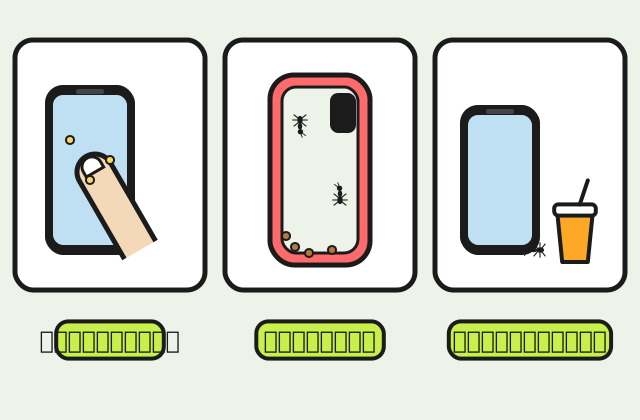
The most common cause is residue from your hands. When you eat snacks or fruit, or drink something sweet while scrolling, sugar and oil end up on the glass, the frame and inside the case. The film is too thin to see, but it smells enough for passing worker ants to follow, especially when the phone is left on the same table as food.
The second cause is the case. Rubber and silicone cases fit tightly around the phone, and bread crumbs, sugar and dust collect in the corners and around the buttons. If you once spilled a sweet drink on it and only wiped the outside, the inside of the case is still sticky. That is why ants in your phone are often really ants between the case and the device.
The third cause is where the phone sits. A phone charging on the bed next to a snack bag, on the dining table, or plugged into a socket whose cord runs from the floor is sitting right on an ant route. Some people notice ants come while charging, but there is no confirmed evidence that warmth from charging attracts them. What can be confirmed is food residue and where the phone is placed.
How do ants get in your phone, and through which openings?
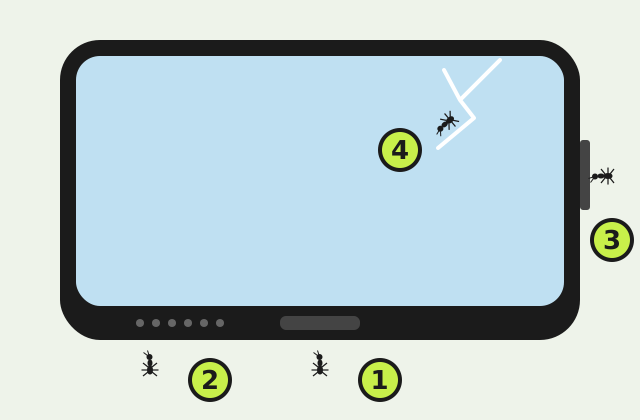
Very small ants enter through openings that already exist: the charging port, the speaker and microphone grilles, the gap around the SIM tray and the slots around the buttons. The widest way in is a cracked screen or a screen edge that has lifted, because the adhesive holding the display to the frame then leaves a gap ants can crawl through and walk under the glass.
Many phones carry a water and dust resistance rating that keeps these openings tighter, but seals and adhesive degrade with age, drops and battery or screen replacements done outside authorised service. A phone that has been repaired may therefore have more gaps than when it was new, which makes ants in your phone more likely. Check your model’s resistance rating in the manufacturer’s documents rather than guessing.
To tell whether they are inside yet, look at the screen in bright light. Dark specks moving under the glass, or ants repeatedly going in and out of the port, mean they are inside. If ants are walking on the surface of the glass and wipe off, they are still outside, and you can deal with them yourself with the cleaning in the next section.
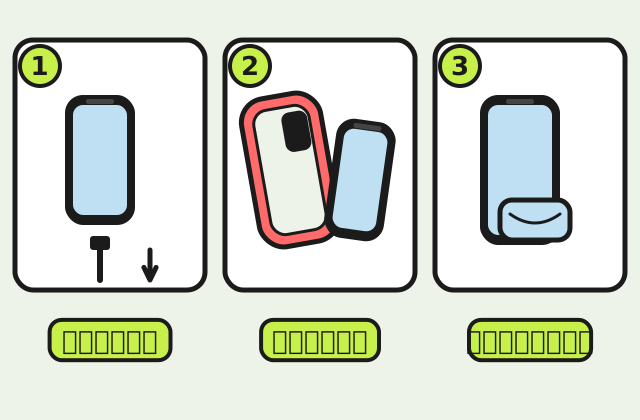
What should you do straight away when you find ants on your phone?
Unplug the charger first, then move the phone away from where the ants are, for example from the bed or dining table to a clean desk. Take the case off and set it aside. Wipe the screen, frame and back with a dry or barely damp microfibre cloth. Most ants on the surface come away on the cloth.
If ants are at the mouth of the charging port or speaker grille, lay the phone with that opening facing down on a sheet of white paper and wait a while. Most will walk out on their own. You can brush the opening lightly with a dry soft brush, but do not poke inside. If ants are under the screen glass, keep the phone off and get ready to take it to a service centre.
Meanwhile, wash the case separately. Most rubber and silicone cases can be washed with water and a little dish soap, but leather cases, magnetic cases and battery cases should be cleaned as their maker recommends. Let the case dry completely before putting it back on, because moisture trapped in the case ends up against the phone’s openings.
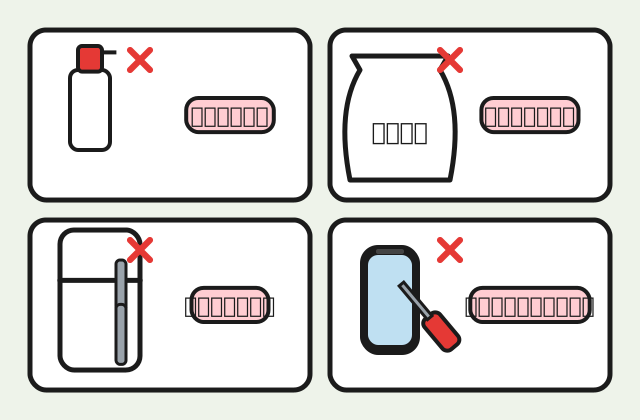
What should you never do about ants in your phone?
Do not spray insecticide or alcohol directly onto the phone, because liquid gets into the port and speaker, and some chemicals wear down the fingerprint-resistant coating on the screen. Do not poke a needle, toothpick or paper clip into the charging port. It can bend the contacts inside and push ants or debris deeper.
Two widely shared tricks are putting the phone in a bag of rice or in the fridge to drive the ants out. Neither is recommended. Rice gives off starchy dust that can lodge in the openings, and a fridge causes condensation inside and out when the phone comes back into warm air, which is a bigger risk to the circuits than a few ants.
Do not open the back or lift the screen yourself unless you are a technician. Modern phones are glued together and need special tools. Opening one yourself can tear ribbon cables or damage the battery, and may affect the warranty. Do not use a hair dryer to drive ants out, because built-up heat is bad for the battery.
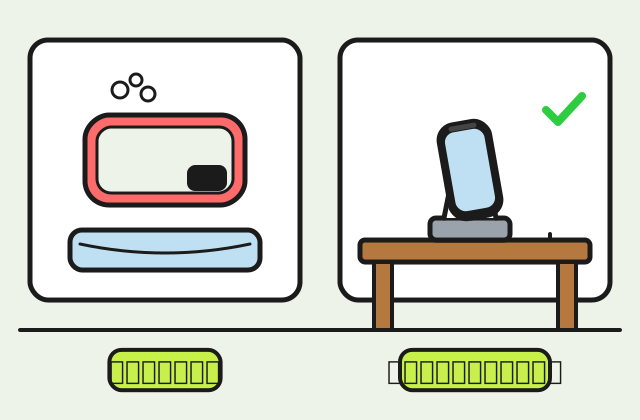
How should you look after the case and charger so ants do not come back?
Wash or wipe the inside of the case regularly, especially after eating while using the phone. A case with sticky patches or yellowed corners should be washed or replaced, because old residue is what keeps bringing ants back even after you wipe the screen. A daily wipe of the phone with a microfibre cloth stops residue from building up.
The charger should be on a clean desk or shelf, not on the floor, the bed or next to a plate of snacks. A cable running from a floor socket up to the desk is a bridge ants can climb to reach the phone. Use a power strip that sits on the desk, or clip the cable so it does not touch the floor or wall.
If ants come to your desk regularly, not just as ants in your phone, how to organise the desk, store snacks and block the route at the desk legs is in ants on the desk. If you also use a laptop on the same desk and ants get into the keyboard, which needs handling differently from a phone, read ants in a laptop.
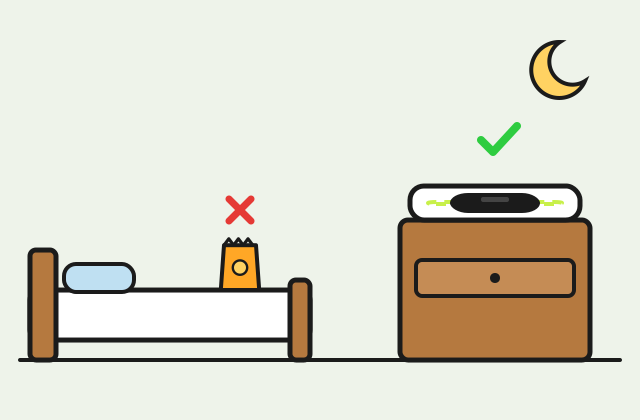
Where should the phone go at night, and can you use an anti-ant pad?
Night is when ants are busiest and you are not watching. Put the phone on a bedside table with no food on it, not on the bed or under the pillow, and do not eat snacks in bed and leave the phone beside the bag. If ants are already in the bed, a phone lying on it will get them too. How to deal with the bed is in ants in the bed.
An anti-ant pad works for a phone as a fixed resting spot. Lay the pad on the bedside table or desk and put the phone and its charging stand in the middle, 5 cm from the edge, as the manufacturer recommends. A 30x42 cm pad holds a phone, a watch and earbuds together. Size and price are on the 30x42 cm anti-ant pad page.
The key condition is that the charging cable must not hang from the pad to the floor or run along the wall, because ants will follow it over the edge. Plug it into a socket on the same table, and wipe the pad when dust or crumbs land on it. The pad blocks the route but does not remove sweet residue from the phone, so you still need to wipe the phone and case.
Are ants under the phone screen dangerous for the device?
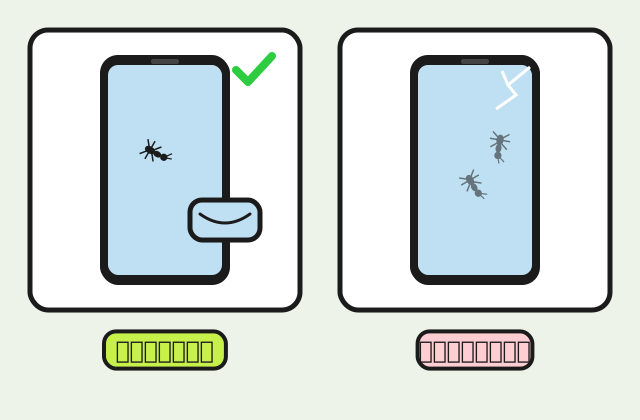
Ants that get under the screen glass or inside the phone do not always break it straight away, but there are risks worth having a technician check: dead ants left on the circuit board or connectors, residue they carry in, and a cracked screen that also lets dust and moisture in. The longer they stay, the harder the build-up is to remove.
Signs that you should get to a service centre soon include spots or shadows on the display that do not go away, parts of the touchscreen not responding, a crackling speaker, charging that does not start or only works when you wiggle the cable, and the phone getting unusually hot. These can have other causes too, which a technician can check properly.
If ants are only on the surface of the glass or on the screen protector, not under the glass, they are still outside and you can wipe them off using the steps above. If a screen protector has lifted at the edge, ants may get stuck between the protector and the glass. Replacing the protector solves that without a trip to the service centre.
When should ants in your phone send it to a service centre, and what should you prepare?
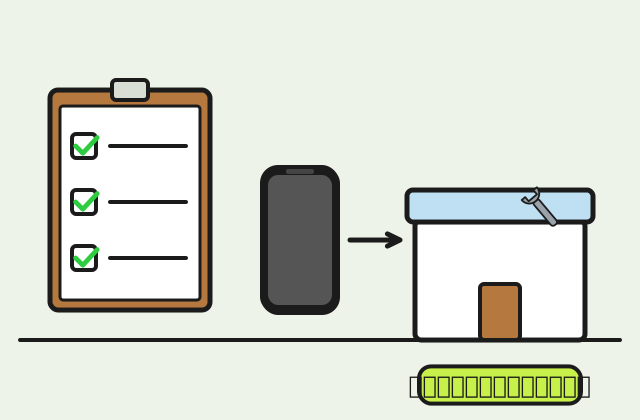
Take the phone to a service centre when you see ants under the screen glass, when ants keep going in and out of the port or speaker after you have wiped it, or when the phone behaves abnormally after the ants appeared. The brand’s service centre or a trusted repair shop has the tools to open the phone and clean the board properly, which cannot be done at home.
Before you go, back up your data if the phone still turns on, and note where you saw the ants go in, when, and what symptoms there are. Ask the service centre whether this is covered by the warranty or any device insurance you bought, because each brand and each plan words its terms differently and we cannot answer that for them.
While waiting, keep the phone off or use it as little as possible, do not charge it if there are ants in the port, and store it in a clean box or zip bag so new ants do not follow. After you get it back, fix the cause too: wipe off residue, wash the case and change where you keep the phone, or the ants will return.
FAQ: ants in your laptop
Can ants get inside a laptop screen?
Yes, on some models where the screen has gaps at the edge. They usually show up as moving black dots behind the screen glass. Don't press or tap the screen. Shut the laptop down, leave it somewhere cool and bright, and wait for the ants to leave on their own. If they haven't left within 2–3 days, take it to a repair shop.
Is it safe to use ant bait near a laptop?
Put the bait on the floor away from the laptop, not on the same desk. Closed bait stations are safer than open gel bait if you have children or pets.
Can I blow them out with a hair dryer?
Only on the cool setting, and from a distance. Hot air from a dryer can damage the keys and the battery. A can of compressed air is safer.
Can I put my laptop on an anti-ant pad while using it?
Not recommended. The pad covers the vents on the bottom and doesn't dissipate heat. Only use it under the laptop when it is switched off or charging.
Why do ants get into laptops in dorms or condos with no kitchen?
Because of snacks and drinks on the desk, and pipes or gaps in the walls that let ants walk in from next door. Keep food in sealed containers, wipe the desk every day, and seal the gaps in walls or window frames where ants get in.
Will ants inside my phone come out on their own?
Some do, especially those only at the mouth of the port or speaker grille, if you lay the phone with that opening down on white paper and wait. Ants that are under the screen glass or deep inside may not be able to get out and may die there. If you still see ants under the screen after a day, take it to a service centre.
Ants keep walking on my screen but never get inside. What should I do?
It means there is still residue on the screen or in the case that draws them. Wipe the screen daily, wash the inside of the case, wash your hands before using the phone after snacks and keep the phone away from food. If the ants come from the same bed or desk every day, deal with that spot too.
Can I wipe my phone with alcohol to get rid of ants?
Some manufacturers allow a specific alcohol concentration on the outer surfaces and some advise against it, so check your brand’s guidance. Never pour or spray it onto the phone, and keep liquid out of the port and speaker. A microfibre cloth that is barely damp removes sweet residue well enough.
Ants got into my tablet or wireless earbuds. Same approach?
The same principles apply: wipe residue, do not spray, do not poke openings and do not open the device. For an earbud charging case with ants in it, open the lid on white paper to let them out, then wipe inside with a dry cloth. If ants are inside the earbuds or the case body, contact the brand’s service centre.
Do a waterproof case or screen protector stop ants getting in?
A screen protector can cover small cracks in the screen, and a case with port covers reduces access through the charging port. But if the case holds sweet residue, ants will simply live in the case instead. Keeping the phone and case clean, and replacing a cracked screen, helps more.
There are ants on my phone in the car. What should I do?
Take the phone out of the car, wipe it and wash the case with the same steps, then deal with the car too, because ants in cars usually come from food crumbs on the floor mats or from parking under trees. See ants in the car. Do not leave the phone in a car parked in the sun, because heat is bad for the battery.